Articles /
Your head unit is linked. Which rides actually get a CdA?
After Garmin opened up linking, several of my athletes linked their head units one after another. Then the same question started coming in: "It's linked, so why is there still no CdA?"
Most of the time nothing is broken. That ride just could not be calculated in the first place. Your head unit sends over everything, but far fewer rides can actually be used to work out CdA than people expect. This article explains which rides get skipped and why, and how to ride so the next one gets a number.
What CdA is and why it is worth tracking over time, I covered in What is CdA?. This article is only about which rides get a number.
Check one: can this ride be calculated at all?
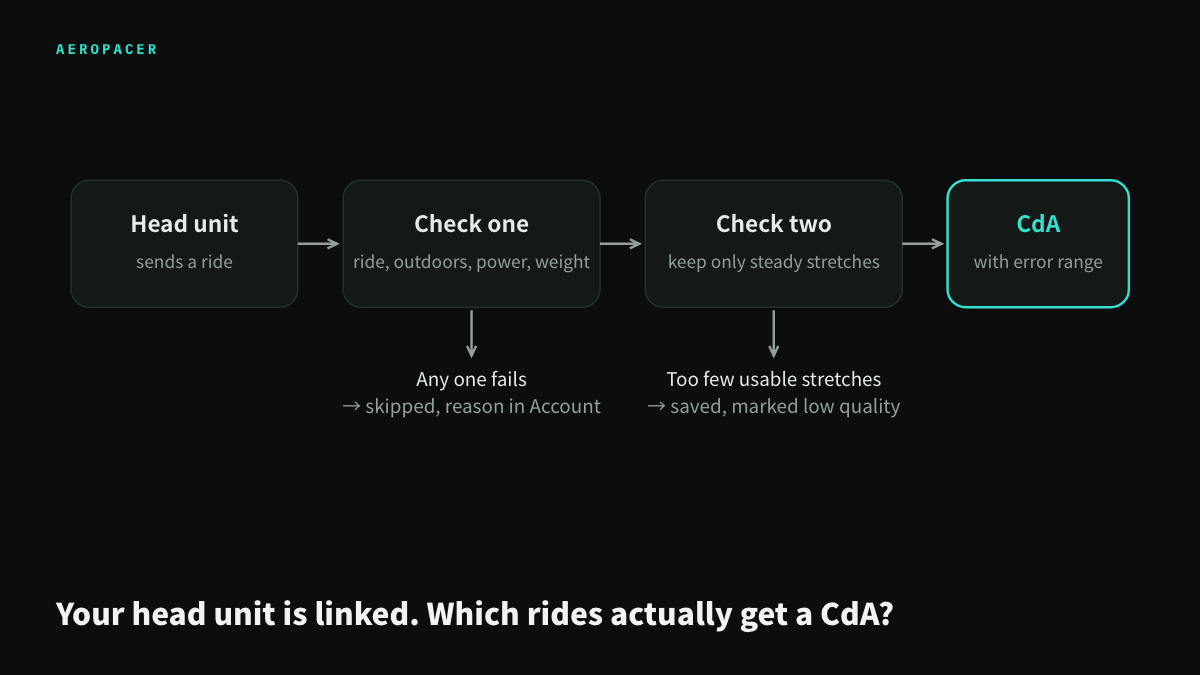
As soon as an activity comes in, the system checks four things. If any one of them fails, the ride is skipped:
- Is it a ride? A triathlete's watch records everything, and runs and swims get sent over too. Running can measure power as well, so the system checks the sport type first, so that running power does not get counted as a ride.
- Is it outdoors? An indoor trainer or Zwift has no real air resistance, so the number would mean nothing. Zwift files also carry GPS coordinates from the virtual map, which look a lot like an outdoor ride, so the system checks for them separately and blocks them.
- Does it have power? CdA is worked out backwards from how many watts you put out and how fast you went. No power, nothing to start from.
- Is your weight filled in? Climbing, speeding up and slowing down all depend on weight. If Account settings has no weight, there is no estimate. Fill in Bike + gear weight while you are there too, and the number will be more accurate.
There is one more field that will not block you, but a lot of people miss it: Riding position in Account settings. Every ride is filed under the position you had set at the time. A Tri/TT bike and a road bike have very different CdA, and the system will not mix them together. Before you switch bikes, change it first.
Check two: which stretches of a ride can be used?
Once a ride passes check one, the system cuts it into many short stretches, checks each one, and keeps only the steady ones: fast enough with no surging and easing, pedaling the whole time, flat road, not cornering, and not too much crosswind.
Why so picky? Each stretch has to solve one equation: the force you put in equals climbing, rolling resistance, aero drag and acceleration added together. Braking, cornering, starting from a red light, or a road that keeps going up and down all add a force to the equation that cannot be measured, and the CdA comes out wrong. Better to use a few fewer stretches than to use bad ones.
There have to be enough usable stretches to get a number. A ride with only a few is still saved, but marked low quality, and it is not used for the long-term converged value.
So if Account settings shows an outdoor ride as skipped or marked low quality, it was usually a city ride with red lights the whole way, or a ride spent climbing up and down in the mountains. The file is not broken. The system just could not find enough usable stretches.
How to ride so the next one gets a number
You do not need a special ride just to test CdA. On a normal long session, one stretch that does the following is enough:
- Find a flat road and ride 20 min or more without stopping. A riverside path, a coastal road, a farm road with no traffic lights all work well. Ride 3 h but stop at a red light every 2 km, and you will get nothing.
- Use your race position and ride steadily. It does not have to be hard, just do not sprint one moment and coast the next.
- Ride on your own and do not draft. Sit behind someone and your aero drag drops by 20 to 30%, so the CdA comes out unrealistically low. Group ride files still get calculated, but treat that number as a rough reference only.
- Even better if you can ride the same stretch out and back. Headwind going out, tailwind coming back: ride the same road both ways and the errors from grade and wind are more likely to cancel out.
- Zero your power meter before you head out, and pick the right Tires and road surface in Account settings. If the power reading is off, the CdA is off with it. Pick the wrong surface and rolling resistance comes out wrong.
As for wind, you do not need to avoid windy days. The system pulls the weather for where you were at the time you rode and takes the wind out. What really causes trouble is gusty, messy wind. On a day like that, the error range for that ride comes out wider.
Once you have a number, how to read it
Every ride gives you a CdA with an error range. A narrow range means that ride had plenty of usable stretches and they agreed with each other. A wide range means the wind was messy that day, or there were not many usable stretches.
The number from a single ride will jump around, and that is normal. Five of my own training ride files from this spring, all on the same Tri/TT bike, had the highest more than 30% above the lowest (see What is a good CdA?). So do not draw a conclusion from one ride.
A free account shows the value for each of your last 5 rides, and every ride is saved. CdA Pro combines all your rides into one converged value, and the more records there are, the narrower the error range. Rides that look very different from your usual ones, such as drafting, a position that fell apart, or the wrong position selected, also get flagged automatically.
A few common situations
Will rides from before I linked come in? Depends on the brand. Wahoo, Hammerhead and COROS pull in your recent rides as soon as you link. Garmin only sends new activities from after you link, and older ones cannot be pulled back. If you need them, export the FIT files from Garmin Connect and upload them yourself on CdA analysis.
How long after a ride does it show up? For most head units, it comes in shortly after the ride syncs to the phone app. COROS waits for the system to fetch on a schedule, so it is a bit later; opening the CdA analysis page also triggers a check.
My head unit and my watch both recorded the same ride? It is only counted once. The other one is marked "This ride already has a record from another device".
Where do I see why a ride was skipped? In the Head unit auto-sync section of Account settings, the results for your last few activities are listed, and skipped ones show the reason.
If you have linked but still see no number, do not rush to link again. Wait for the next ride that is outdoors, has power, and has a flat stretch ridden steadily, and it will show up in your CdA analysis.